Automatic Phase Changes
Documents move between phases automatically through the Phase Management report. The report is usually scheduled in the job queue (see Setup), but it can also be run manually from the Document Phase Management menu.
How the Next Phase Is Selected
The report goes through the documents with Include in Phase Management enabled (or all documents, if Include All Documents is enabled on the request page) and, for each document, looks for a phase of the same document type into which the document can move. A document moves into a phase when all of the following conditions are met:
- The current phase of the document is included in the Previous Phase Filter of the new phase.
- The Reason Code of the document matches the Reason Code Filter of the new phase.
- The Payment Method Code of the document matches the Payment Method Code Filter of the new phase.
- The Paid status of the document matches the Payment Confirmed field of the new phase (sales documents only).
- The document has stayed in the current phase for at least the number of days set in Interval (Days).
- The conditions of the phase Type are met, if a type is set.
Phases with Exclude from Phase Management or Canceled enabled are skipped.
Note
If more phases meet the conditions, the document moves into the first of them in alphabetical order of the phase code. Keep this in mind when you name the phases – e.g. use prefixes such as B2B_01, B2B_02.
After the phase changes, the actions assigned to the new phase run and the change is recorded in the Phase Log.
Request Page
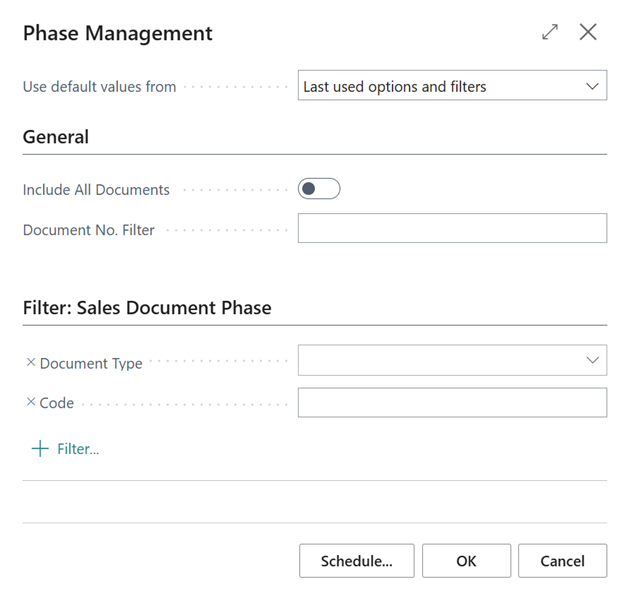
- Include All Documents – processes all documents regardless of the Include in Phase Management field on the document.
- Document No. Filter – limits the processing to the specified documents.
- Filter: Sales Document Phase – limits the processing to selected phases, e.g. by Document Type or Code.
Phase Types
Phase types are used when a phase needs additional conditions that cannot be set with the standard fields. The base extension does not contain any phase types – they are provided by other extensions, which can thus identify and switch phases according to their own logic.