Disagreement Card
A Disagreement card is created when an undesirable situation arises - it can concern both material and non-material flows in the company (e.g. poorly trained employees). The Disagreement card is divided into a header, the Fault part and lines. The header contains basic information about the Disagreement, the Fault part records the degree of fault of the company sources, and the lines are used to record the solution.
Disagreements are usually created from a Return Claim line with the action Create Disagreement (a Disagreement of the type External is created for customer Return Claims, Internal for vendor Return Claims), but they can also be created manually in the Disagreement List.
Disagreement Header
General Tab
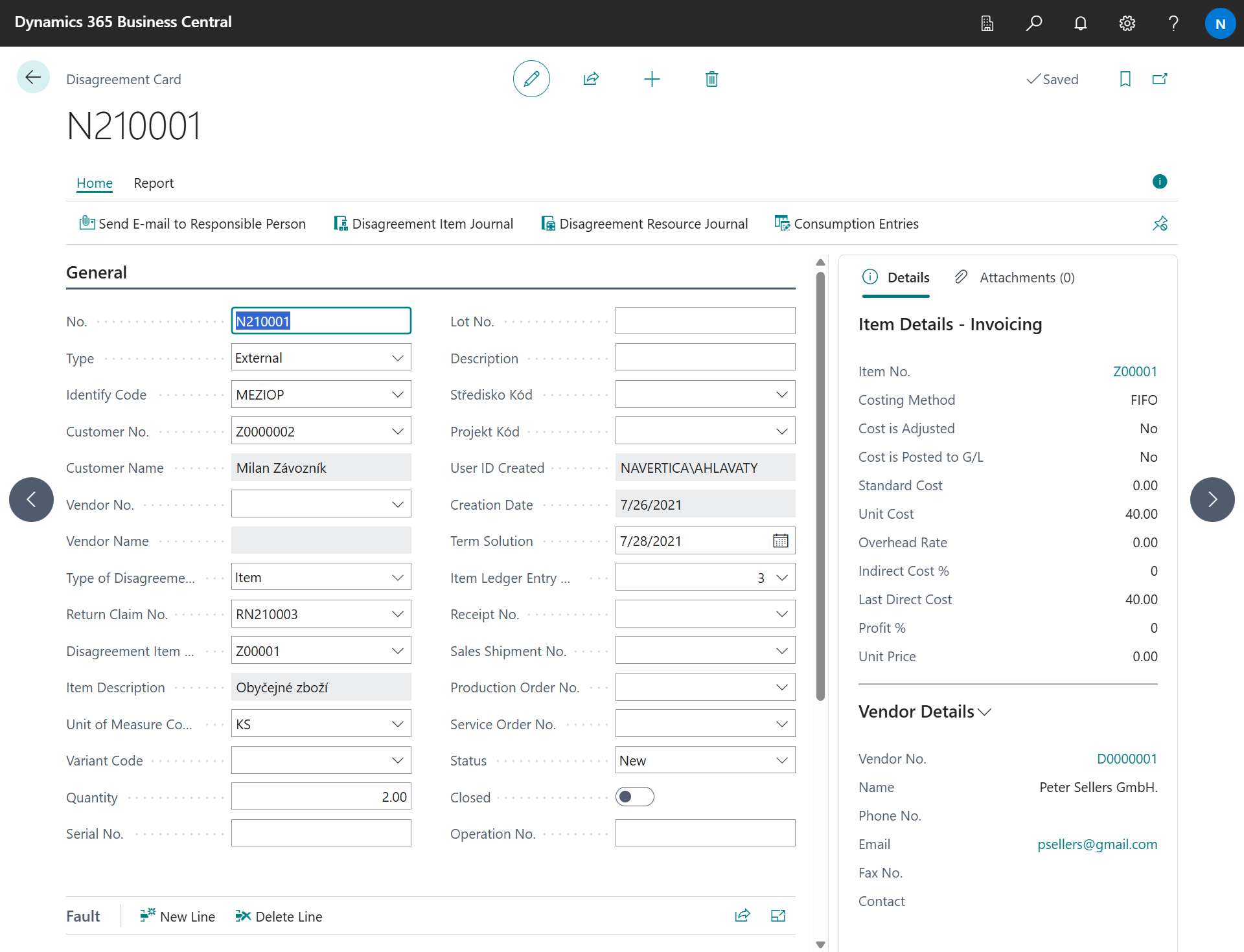
-
No. - the number of the Disagreement, assigned from the number series defined in the setup.
-
Type - selection from the Internal / External options. It indicates the manner in which the Disagreement was found: External indicates Disagreements that were reported by the customer (in the form of a Return Claim) or another external entity, internal Disagreements are those that were found within the company.
-
Identify Code - a parameterizable code list (it is possible to enter values according to your own needs) which points more precisely to the area where the Disagreement was discovered (e.g. production, warehouse, shipping, etc.). Set in the table Identify Disagreements. The Responsible Person of the code is filled into the Disagreement automatically.
-
Customer No., Customer Name - selection from the list of customers.
-
Vendor No., Vendor Name - selection from the list of vendors.
-
Type of Disagreement - a predefined code list containing the options Item, Non Stock Item and Service.
-
Return Claim No. - if the Disagreement is related to a Return Claim, this field is filled in (either automatically or manually).
-
Disagreement Item No. - determines which item or service is related to the Disagreement. If the Disagreement arose from a Return Claim, this value is pre-filled; Item Description shows its description.
-
Quantity - the quantity of the subject of the Disagreement.
-
Unit of Measure Code - the unit of measure in which the Disagreement is established.
-
Variant Code - the variant of the item.
-
Serial No., Lot No. - the serial number and the lot number of the items to which the Disagreement relates.
-
Description - a description of the Disagreement, which specifies the characteristics of the Disagreement.
-
Global Dimension 1 Code, Global Dimension 2 Code - a selection of the global dimensions used in the company. It is used for statistical purposes (e.g. where the most Disagreements occurred).
-
User ID Created and Creation Date - automatically filled after creating a new Disagreement record (current user and system date).
-
Term Solution - the date by which the Disagreement must be resolved. The individual Term Solution dates on the Disagreement lines must not exceed this date.
-
Item Ledger Entry No. - defines to which item ledger entry the Disagreement card relates. Filling it in also fills the partner, the document numbers and the item tracking; Receipt No. and Sales Shipment No. show the source documents.
-
Production Order No. - defines to which production order the Disagreement card relates. If you need a production order to solve this Disagreement, you can put it in this field to link it; Operation No. then specifies the routing operation.
-
Service Order No. - defines to which service order the Disagreement is related.
-
Status - the status of the Disagreement. The statuses are the same as for Return Claims: New, Pending, To Review, Reviewed, Finished, Closed. The status is synchronized back to the Return Claim line the Disagreement was created from.
-
Closed - checking this checkbox closes the Disagreement. The Disagreement must be in the status Finished and all vendor Return Claims created from it must be finished. The system fills the Closing Date and the Disagreement is moved to the archive.
Fault
Contains information about the fault of the individual company sources (e.g. employees, machines) in the Disagreement. The degree of fault is determined as a percentage.

The table for determining the degree of fault contains the following fields:
-
Source Type - whether it is a Source (resource), Machine Center, Employee or Work Center.
-
Source - selection from the file of the relevant source, linked through the Source Type.
-
Percent - percentage expression of the degree of fault of the specific source.
-
Reason - a field used to describe the cause leading to the Disagreement.
Handling
The Handling tab contains the following fields:
-
Costs of Items - the costs of the items consumed for the Disagreement. The field is calculated automatically from the Disagreement consumption entries.
-
Costs of Resources - the costs of the resources consumed for the Disagreement. The field is calculated automatically from the Disagreement consumption entries.
-
Internal Costs - manually entered internal costs of the Disagreement.
-
Total Expenses - the total costs of the Disagreement (items + resources + internal costs).
Responsibility
This tab contains the information about the responsible person: Responsible Person, Responsible Person Name and the date and time of the sent e-mail notification (Sending Date (E-mail), Sending Time (E-mail)).
Lines
Disagreement lines are used to describe the steps that lead to the resolution of the Disagreement. Multiple lines can be registered in a Disagreement, because it can be a sequence of steps that lead to a solution.

The following fields are registered on the line:
-
Line No.
-
Line Type - Corrective for lines solving the existing Disagreement, Preventive for preventive measures.
-
Investigator - the solver of the line. Selection from the list of employees.
-
Term Solution - the date by which the line must be resolved. It must not exceed the Term Solution of the header.
-
Problem Code - selection from the Disagreement Problem Codes.
-
Reason Code - selection from the reason codes defined in the table Disagreement Reason Codes.
-
Quantity - the quantity needed to resolve the given line of the Disagreement. The quantity on any single line may not exceed the quantity of the header, but the total quantity of all lines may exceed it. This is because more lines may be needed to resolve the Disagreement - for example, the first line repairs the product, the second line sprays the paint, the third line represents regrinding, etc. Each line is performed by a different solver, but it is physically the same piece.
-
Solution Code - the solution code can take the values: Return Claim to Vendor, Repair, Scrap, Rework, Regrade. It can be entered on lines of the type Corrective. If the solution code is Return Claim to Vendor, the line function Create Return Claim to Vendor can be used.
-
Measure Code - the preventive measure, defined in Disagreement Measures. It can be entered on lines of the type Preventive.
-
Finished, Finished Date - marks the line as finished; the date is filled in automatically.
-
Return Claim No. to-Vendor - provided that the solution of the line is a Return Claim to the vendor, the number of the created Return Claim is entered in this field.
-
Return-to Vendor No. - determines to which vendor the Return Claim created from the Disagreement will apply.
Disagreement Card Actions
-
Consumption Entries - if internal sources (capacities or material) are consumed to resolve the Disagreement, the reported consumption can be displayed using this button. The entries record the posted quantity, the costs and the source journal.
-
Disagreement Item Journal - opens the item journal for posting the material consumption of the Disagreement. The journal line carries the Disagreement No.; after posting, the consumption appears in the Consumption Entries and in the costs of the Disagreement.
-
Disagreement Resource Journal - opens the resource journal for posting the work (resources) consumed by the Disagreement.
-
Send E-mail to Responsible Person - you can use this action to send an e-mail notification of the Disagreement to the responsible person. Sending notifications using this function is for quick transmission of information from the quality management department to the other departments where Disagreements arise.
-
Disagreement Protocol, Rejected Product - print reports of the Disagreement (see Protocols).
Disagreement Line Actions
-
Create Return Claim to Vendor - a function that creates a vendor Return Claim if the solution code Return Claim to Vendor and the Return-to Vendor No. are entered on the line. The claimed item can be added to an existing open vendor Return Claim or a new one is created. The created vendor Return Claim is linked back to the customer Return Claim line.
-
Disagreement Information - records the rich text description of the Disagreement and of its solution (Disagreement Description, Solution Description).
Closed Disagreements
Closed Disagreements are moved to the Disagreement Archive List and can be displayed in the read-only Closed Disagreement card, including the consumption entries and the protocol.