Phases on Documents
The extension adds the Phase Management group to the headers of all supported documents (Sales Order, Sales Invoice, Sales Credit Memo, Transfer Order, Posted Sales Invoice, Sales Archive).
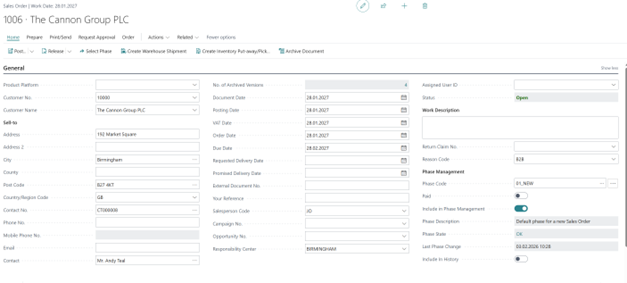
- Phase Code – the current phase of the document. Only the phases of the given document type are offered. The field can be edited only by users with the permission set defined in Admin Permissions in Sales & Receivables Setup; other users change the phase with the Select Phase action.
- Phase Description – the description of the current phase.
- Phase State – the result of the last phase change according to the Phase Log: OK, Validation Error or OK – restarted.
- Last Phase Change – the date and time of the last phase change.
- Paid – specifies whether the document has been paid. The field is used in the Payment Confirmed condition of the phases.
- Include in Phase Management – specifies whether the document is processed by the Phase Management report. The default value is taken from Sales & Receivables Setup.
Selecting a Phase Manually
Use the Select Phase action on the document to move it into a phase manually, e.g. to cancel an order or to delete its reservations. Only the phases marked as Manual Phase are offered.
After you select the phase, the actions assigned to it run in the same way as after an automatic phase change.